Market Connectivity
This guide covers the market connectivity features of Velocimex, including supported exchanges, data feeds, and integration details.
Supported Markets
Cryptocurrency Exchanges
API Version: v3
Websocket Feed: wss://stream.binance.com:9443
Rate Limits: 1200 requests/minute
Order Types: Market, Limit, Stop, OCO
Data Types: L1, L2, L3, Trades, Tickers
API Version: v2
Websocket Feed: wss://ws.kraken.com
Rate Limits: 60 requests/minute
Order Types: Market, Limit, Stop-Loss
Data Types: L1, L2, Trades, OHLCV
API Version: v3
Websocket Feed: wss://ws-feed.pro.coinbase.com
Rate Limits: 30 requests/second
Order Types: Market, Limit, Stop
Data Types: L1, L2, Trades
Stock Markets
Feed Type: ITCH 5.0
Connection: TCP/IP
Data Types: TotalView, Level 2
Latency: < 10μs
Feed Type: Pillar Gateway
Connection: FIX 4.2
Data Types: OpenBook, Trades
Latency: < 50μs
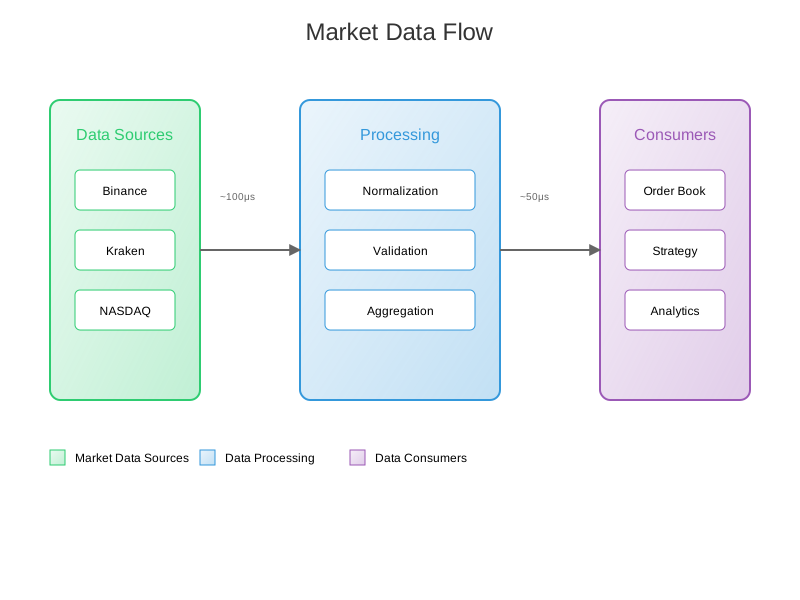
Market Data Flow
Integration Steps
1. API Key Setup
Binance Setup
# Generate API keys at https://www.binance.com/en/my/settings/api-management
export BINANCE_API_KEY="your_api_key"
export BINANCE_SECRET="your_secret_key"
Kraken Setup
# Generate API keys at https://www.kraken.com/u/security/api
export KRAKEN_API_KEY="your_api_key"
export KRAKEN_SECRET="your_secret_key"
2. Market Configuration
Edit config.yaml to enable specific markets:
market_data:
  exchanges:
    - name: binance
      enabled: true
      pairs:
        - BTC-USDT
        - ETH-USDT
      channels:
        - trades
        - book_l2
      options:
        depth: 10
        snapshot_interval: 1000

    - name: kraken
      enabled: true
      pairs:
        - XBT/USD
        - ETH/USD
      channels:
        - trades
        - book
      options:
        depth: 100
3. Connection Management
// Example connection setup
type MarketConnection struct {
    Exchange    string
    Pairs       []string
    Channels    []string
    WSClient    *websocket.Client
    RestClient  *http.Client
}

func NewMarketConnection(config MarketConfig) (*MarketConnection, error) {
    // Implementation details
}
Data Normalization
Order Book Format
{
  "exchange": "binance",
  "symbol": "BTC-USDT",
  "timestamp": "2025-01-01T12:00:00.000Z",
  "bids": [
    ["50000.00", "1.5000"],
    ["49999.99", "2.0000"]
  ],
  "asks": [
    ["50000.01", "1.0000"],
    ["50000.02", "3.0000"]
  ]
}
Trade Format
{
  "exchange": "kraken",
  "symbol": "XBT/USD",
  "timestamp": "2025-01-01T12:00:00.000Z",
  "price": "50000.00",
  "amount": "1.5000",
  "side": "buy",
  "id": "123456789"
}
Error Handling
Common Issues
Rate Limiting
def handle_rate_limit(response):
    if response.status_code == 429:
        retry_after = int(response.headers['Retry-After'])
        time.sleep(retry_after)
        return retry_request(response.request)
Connection Drops
def handle_disconnect(ws):
    backoff = ExponentialBackoff(initial=1, maximum=300)
    while True:
        try:
            ws.connect()
            break
        except ConnectionError:
            time.sleep(backoff.next())
Performance Monitoring
Metrics
Latency Metrics
Connection time
Message processing time
End-to-end latency
Throughput Metrics
Messages per second
Orders per second
Data size per second
Prometheus Metrics
MARKET_DATA_LATENCY = Histogram(
    'market_data_latency_seconds',
    'Market data processing latency',
    ['exchange', 'message_type']
)

MARKET_DATA_MESSAGES = Counter(
    'market_data_messages_total',
    'Total number of market data messages',
    ['exchange', 'message_type']
)
Best Practices
Connection Management
Implement heartbeat monitoring
Use exponential backoff for reconnections
Maintain connection pools
Data Validation
Validate message checksums
Verify sequence numbers
Check timestamp freshness
Error Recovery
Implement automatic failover
Maintain message queues
Log all errors with context
Performance Optimization
Use binary protocols when available
Implement message batching
Optimize memory allocation